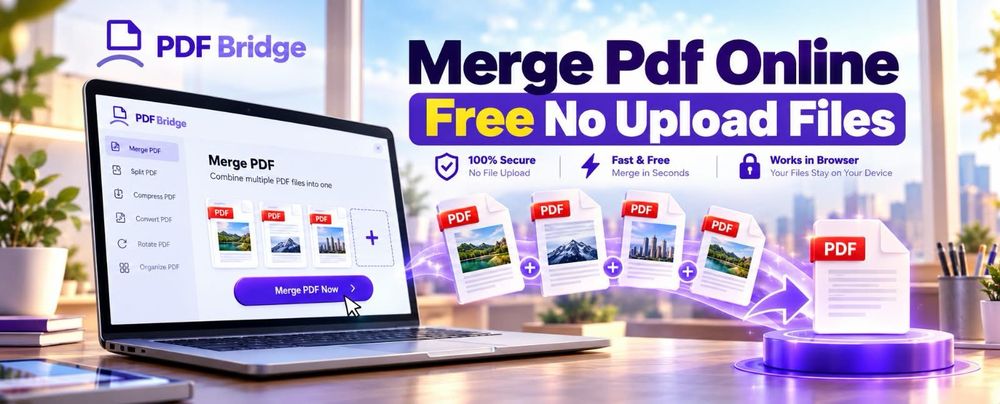
If you need to combine multiple PDF documents into one file but do not want your documents unnecessarily uploaded to a remote server, the first thing to determine is where the PDF processing happens.
A “merge PDF without upload” workflow generally means that your files are processed locally on your device rather than being transferred to a remote server. However, not every online PDF tool works this way, so you should verify the tool's actual processing method before using it for sensitive documents.
For ordinary documents, merging PDFs is straightforward: select the files, arrange them in the required order, combine them, and save the resulting PDF.
For confidential documents, however, the processing architecture matters just as much as the merging feature itself.
What Does “Merge Pdf Online Free No Upload” Mean?
Merging PDFs without uploading means combining PDF files without sending the document contents to a remote server for processing.
Traditional online PDF mergers often use a server-based workflow:
Select PDF files → Upload → Server processes files → Download merged PDF
A local-processing workflow can instead work like this:
Select PDF files → Browser/device processes files → Save merged PDF
The difference is important when you're working with documents containing confidential information.
For example, you might want to combine:
- Employment documents
- Financial statements
- Invoices
- Contracts
- Academic records
- Business reports
- Personal documents
- Legal paperwork
- Internal company files
Before choosing a PDF merger, check how the service handles files. Do not assume that a tool is “no upload” simply because it works inside a web browser.
Can You Really Merge PDFs Without Uploading Them?
Yes, PDF merging can be performed locally in some browser-based applications, depending on how the application is built.
The key distinction is not whether the tool is called an “online PDF merger.” The important question is:
Does the PDF data leave your device during processing?
A web application can provide an interface through your browser while processing files locally using browser technologies. Other web applications may use the browser only as an interface and send the selected documents to their servers.
Therefore, if avoiding uploads is important to you, look for clear documentation from the provider explaining its processing architecture and file-handling practices.
Never rely solely on marketing language such as “private,” “secure,” or “safe.”
How to Merge PDF Files Online
If the PDF tool you're using supports local processing, the general workflow is simple.
Step 1: Select Your PDF Files
Choose the PDF documents you want to combine.
For example, suppose you have:
- Report.pdf
- Appendix.pdf
- References.pdf
You may want to create one final document containing all three.
Step 2: Add the PDFs in the Required Order
The order of your files determines the structure of the final document.
For example:
Report → Appendix → References
is different from:
References → Report → Appendix
Before merging, check that your documents are arranged in the correct sequence.
Step 3: Review the Selected Documents
Before processing the files, verify:
- Correct PDFs are selected
- No duplicate document is included
- The file order is correct
- Unnecessary documents have been removed
- The documents are readable
This is particularly important when combining a large number of files.
Step 4: Merge the PDFs
Start the PDF merging process.
The exact interface depends on the tool you are using. Do not assume that every PDF merger provides the same controls or processing options.
Step 5: Save the Combined PDF
Once processing is complete, save the resulting PDF to your device.
Give it a descriptive filename such as:
Final_Project_Documents.pdf
rather than something generic like:
merged.pdf
This makes the file easier to locate later.
Why Merge Multiple PDFs Into One File?
Combining PDFs can simplify document management and reduce the number of individual files you need to handle.
1. Business Reports
A business report may contain separate PDFs for:
- Main report
- Financial data
- Charts
- Appendices
- Supporting documents
Combining them creates a single document that can be shared and archived more easily.
2. Invoices and Receipts
Businesses frequently deal with multiple financial documents.
Merging related invoices, receipts, or supporting records into one PDF can make organization easier.
3. Academic Projects
Students and researchers may need to combine:
- Assignments
- Research papers
- References
- Appendices
- Supporting material
A merged PDF can create one submission-ready document when the requirements call for a single file.
4. Job Applications
A job application package might contain:
- Resume
- Cover letter
- Portfolio
- Certificates
- Supporting documents
Combining these files can make the package easier to share when a single PDF is required.
5. Legal and Administrative Documents
Contracts and administrative paperwork may include multiple supporting documents. Combining related files can help create a logical document package, provided the documents are arranged correctly.
Merge Pdf Online Free No Upload vs Desktop PDF Software
There are several ways to combine PDF files.
| Method | Internet Required | Installation | Suitable For |
|---|---|---|---|
| Online PDF tool | Depends on processing method | Usually no | Quick PDF tasks |
| Local browser-based tool | Usually only to load the application | No | Privacy-conscious workflows |
| Desktop PDF software | No after installation | Yes | Regular PDF workflows |
| Command-line tools | No | Yes | Technical users and automation |
The right option depends on your workflow.
If you only need to combine a few PDFs occasionally, a browser-based solution may be more convenient than installing dedicated software.
If you regularly process sensitive documents, understanding where the processing occurs becomes more important.
What Should You Check Before Using a “No Upload” PDF Merger?
The phrase “no upload” should not automatically be treated as a guarantee of privacy.
Check the provider's documentation for information about:
File Processing
Determine whether the PDF is processed:
- Locally in the browser
- On your device
- On a remote server
- Through a combination of client-side and server-side processing
File Handling
If files are transferred to a server, check the provider's documented policy regarding:
- File retention
- Automatic deletion
- Storage
- Data processing
- User access
Browser Requirements
Local PDF processing can depend on browser capabilities and the application's implementation.
If a tool does not clearly document how processing occurs, avoid making assumptions about it.
Sensitive Documents
For highly confidential documents, consider whether an offline desktop workflow is more appropriate.
Does Merging PDFs Change the Original Files?
Normally, merging creates a new PDF document rather than modifying the original PDFs.
For example:
Original files
- Document-A.pdf
- Document-B.pdf
- Document-C.pdf
Merged result
Combined-Document.pdf
The original files can remain separately stored on your device.
However, the exact behavior depends on the software or tool being used, so users should check the tool's workflow if preserving the original files is important.
How Many PDFs Can You Merge?
There is no single universal limit for every PDF merger.
The practical limit can depend on factors such as:
- Number of files
- Individual file sizes
- Total document size
- Number of pages
- Available device memory
- Browser capabilities
- PDF complexity
- Processing architecture
For that reason, avoid assuming that every tool supports an unlimited number of files or pages.
If you're combining a large collection of PDFs, test the workflow with a smaller batch first.
What If the Merged PDF Is Very Large?
Merging PDFs does not necessarily reduce their file size.
In fact, the resulting document may become significantly larger because it contains the contents of every input PDF.
For example:
- PDF A: 4 MB
- PDF B: 6 MB
- PDF C: 8 MB
The resulting merged document could be considerably larger than any individual file.
If the merged document is too large for email, a website upload, or another system, you may need to compress the PDF after merging.
This creates a useful workflow:
Merge PDFs → Review document → Compress if necessary → Share or store
Merge First or Compress First?
In many workflows, it makes sense to merge related PDFs first and then evaluate the final document's size.
For example:
- Select the required PDFs.
- Merge them into one document.
- Check the resulting file size.
- Compress the merged PDF if necessary.
- Verify that the document remains readable.
- Share or archive the final version.
Compression can affect image quality and other document characteristics, so always review the final file before sending it.
Common PDF Merging Mistakes
Uploading the Wrong Documents
Always check the selected files before starting the merge.
Incorrect Page Order
A merged document can become confusing if supporting documents appear before the main document or pages are arranged incorrectly.
Duplicate Files
When working with many PDFs, it is easy to accidentally add the same file twice.
Ignoring File Size
A merged document containing many high-resolution PDFs can become difficult to email or upload.
Assuming “Online” Means “Uploaded”
A browser-based PDF application does not automatically tell you whether files are transferred to a server.
Check the provider's documentation.
Not Checking the Final PDF
Always open the merged document and review:
- Page order
- Missing pages
- Formatting
- Images
- Text
- File size
- Overall readability
Is It Safe to Merge Sensitive PDFs Online?
There is no universal answer because the security and privacy properties depend on how the specific PDF service processes and handles files.
For sensitive documents, investigate:
- Whether files leave your device
- How files are transmitted
- Whether files are stored
- How long files are retained
- Whether files are automatically deleted
- What privacy controls the provider documents
If the information is highly confidential, an offline PDF workflow may be preferable.
Do not treat the word “secure” alone as proof that a PDF service meets your privacy requirements.
Who Can Benefit From a No-Upload PDF Workflow?
A local PDF-processing workflow can be particularly relevant to people who regularly work with documents that they do not want to transfer to third-party servers.
Potential users include:
- Accountants
- Lawyers
- HR professionals
- Students
- Researchers
- Freelancers
- Business owners
- Consultants
- Administrative professionals
- Remote workers
- Financial professionals
The appropriate workflow depends on the sensitivity of the documents and the processing capabilities of the selected tool.
Merge PDFs With PDFBridge
If you need to combine PDF documents, PDFBridge can be considered as part of your PDF workflow where its available merge functionality matches your requirements.
The important thing is to choose a workflow based on the actual task, the type of documents you're handling, and the way the tool processes those files.
Ready to combine your PDF documents? Use PDFBridge's verified PDF merging tool and follow the documented workflow for processing your files.
Conclusion
Merging PDF files is useful whenever several related documents need to become one organized file.
For users searching for “Merge Pdf Online Free No Upload,” the key issue is not simply finding a free PDF merger. It is understanding how the tool processes your documents.
If avoiding uploads is important, verify whether processing occurs locally rather than assuming that every browser-based PDF tool works that way.
For everyday documents, an online PDF merger can provide a convenient workflow. For sensitive documents, processing architecture, privacy documentation, file handling, and retention policies deserve closer attention.
The best PDF workflow is therefore the one that solves the document task while matching the user's privacy, usability, and file-management requirements.
Frequently Asked Questions
Can I merge PDF files online for free?
Yes, PDF merging can be available through free online tools. However, whether a particular service processes files locally or uploads them to a server depends on the tool's implementation.
Can I merge PDFs without uploading them?
Some browser-based PDF applications can process files locally. Verify the provider's documentation before assuming that a specific tool operates without uploading files.
What is the difference between online PDF merging and local PDF merging?
Online server-based merging can transfer files to a remote server for processing. Local browser-based or desktop merging can process documents on your device instead.
Will merging PDFs reduce their file size?
Not necessarily. Combining PDFs generally combines their contents and can produce a larger file. Compression is a separate process.
Can I combine several PDF files into one?
Yes. PDF merging is specifically designed to combine multiple PDF documents into a single document, subject to the limitations of the software being used.
Will my original PDFs be deleted after merging?
That depends on the tool and its workflow. A PDF merger should not be assumed to delete your local source files unless the application specifically performs that action.
Should I merge or compress PDFs first?
If your objective is to create one document, merge the relevant PDFs first and then evaluate the resulting file size. If the final file is too large, compression can be performed afterward.
Can I merge confidential documents online?
You should first determine how the particular service processes and handles files. For highly sensitive information, consider an offline workflow if appropriate.